本文へ
TOP無料版Microsoft Store版ライセンス

YuHex · Microsoft Store Edition

横断検索ガイド

複数ファイルから探し、結果から一致位置を開く。

横断検索の使い方

サブフォルダーも含む複数のバイナリファイルから、16進バイト列を横断検索できます。ファイルの内容は変更しません。

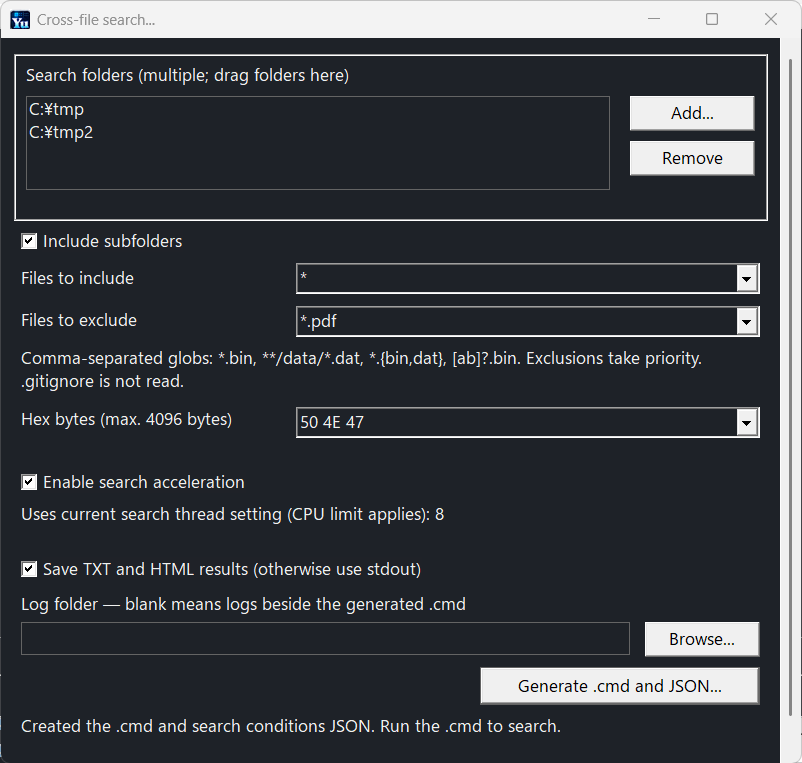
  1. 「ツール → 横断検索…」を開き、対象フォルダーを追加します。複数のフォルダーをドラッグ&ドロップでも登録できます。
  2. 含める/除外するファイル、検索値(最大4096バイト)、サブフォルダー、高速化、ログ保存を指定します。
  3. 「.cmdを生成…」で保存し、生成した .cmd を実行してください。
英語版の横断検索設定。2つのフォルダー、除外条件、検索値、ログ保存を指定した画面
横断検索の設定例(英語UI)。複数フォルダーを登録し、検索条件とログ保存を指定します。 画像をクリックすると拡大できます。

高速化は既存の検索スレッド数設定(初期値8、最大32)を使い、CPU数を上限に検索全体で共有します。OFFでは1スレッドです。

含めるファイル・除外するファイル

条件を複数指定するときはカンマで区切ります。大文字・小文字は区別しません。

書式意味例
,条件の区切り。いずれかに一致すれば対象になります。*.bin, *.dat は.binまたは.datのファイル。
*パスの区切りを除く、0文字以上の任意の文字列。data*.bin はdata.bin、data01.binなど。
?パスの区切りを除く、任意の1文字。data?.bin はdata1.binなど。data.bin、data12.binは対象外。
**フォルダー階層をまたぐ、0文字以上の任意の文字列。**/data.bin はdata.bin、sub/data.bin、sub/deep/data.binなど。
[abc]a・b・cのいずれか1文字。文字列abcを意味しません。[abc].bin はa.bin、b.bin、c.bin。abc.binは対象外。
[a-z]aからzまでの英字のいずれか1文字。大文字も対象です。[a-z].bin はa.bin、Z.binなど。1.binは対象外。
[!abc]a・b・cのいずれでもない1文字。「a以外+bc」や「文字列abc以外」という意味ではありません。[!abc].bin はd.bin、1.binなど。a.bin、b.bin、c.bin、ab.binは対象外。
{bin,dat}列挙した文字列のいずれか。波括弧内のカンマは、条件全体の区切りにはしません。*.{bin,dat} は*.binまたは*.datと同じ。

フィルター内のパスの区切りは / と \ の両方を使えます。sub/*.bin と sub\*.bin は同じです。このガイドでは見やすさのため / を使っています。

各対象フォルダーからの相対パスで判定し、通常はどの階層にも一致します。./data/*.bin のように ./ で始めると対象フォルダー直下を起点にできます。含める条件が空なら全ファイルが対象です。除外が優先され、除外したフォルダーの中は検索しません。生成成功時にフィルター履歴を保存し、同じ設定ファイルを使うアプリ間で共有します。

標準出力・TXT・HTML

ログ保存は初期状態OFFです。検索結果をコンソールへ出力し、生成した .cmd は最後にキー入力を待ちます。ログ保存をONにするとTXTとHTMLを同時保存します。保存先が空なら、生成した .cmd と同じフォルダー内に logs を作ります。

結果はファイルごとにまとめ、一致オフセット・長さと、一致開始位置を含む16バイト行を表示します。行をまたぐ一致は続きを省略したことを示します。HTMLは500件ずつに分割され、索引・前後ページから閲覧できます。HTMLフォルダーは中のファイルをまとめて保管してください。

HTMLの「Open in YuHex」はファイルを開いて一致位置へ移動し、「Show in Explorer」はファイルの場所を表示します。ブラウザに起動確認が出る場合があります。ファイルが検索後に変更・削除されている場合は結果と現在の内容が異なるか、開けないことがあります。展開したEXEだけを使う場合は、表示されたパスやコマンドを利用してください。
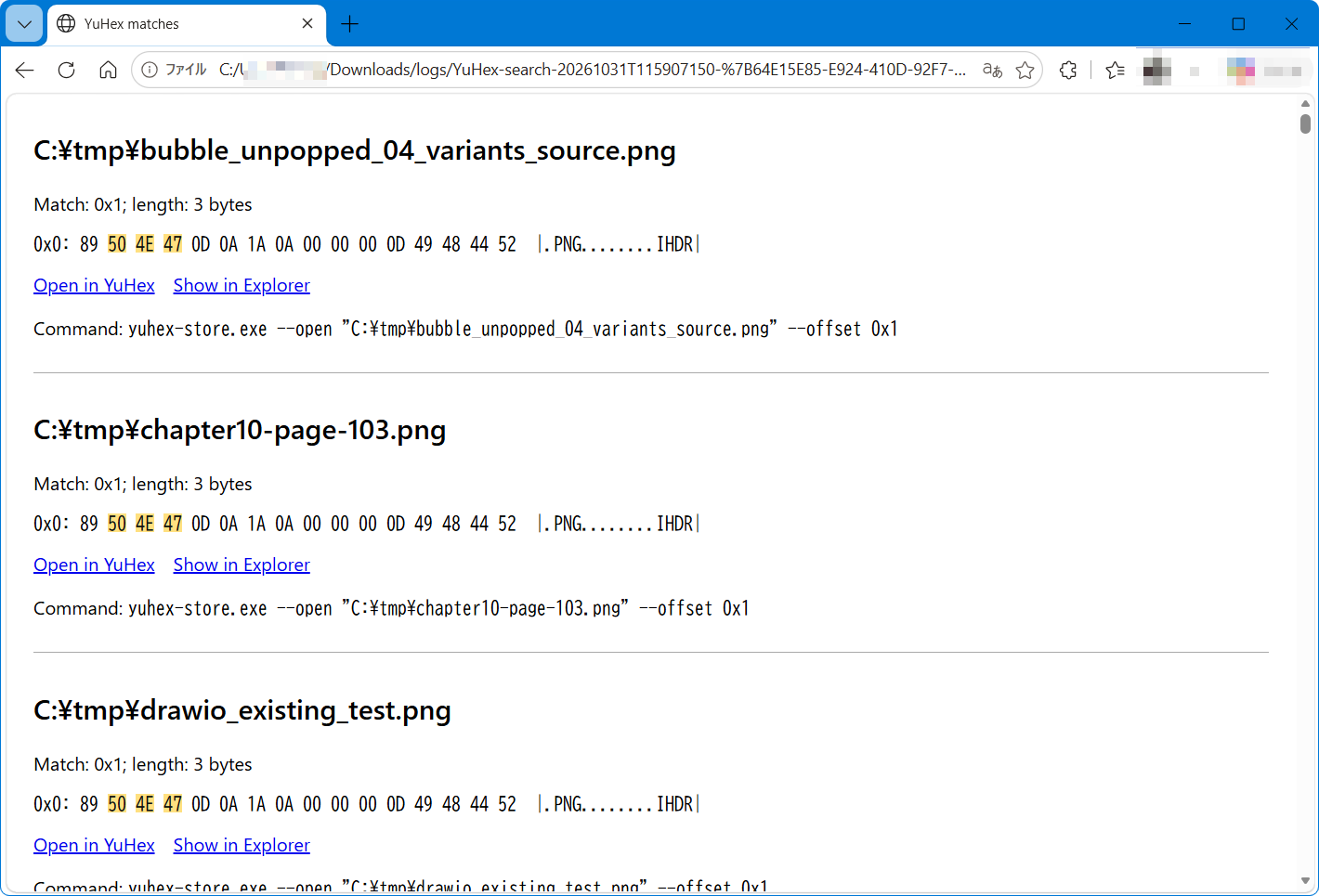
英語版のHTML検索結果。一致位置の16進表示とYuHex・Explorerを開くリンク
HTMLの検索結果(英語UI)。一致したバイトが強調され、Open in YuHexで該当位置、Show in Explorerでファイルの場所を開けます。 画像をクリックすると拡大できます。

専用リンクとエイリアスの登録・確認・解除については、インストールによる変更とアンインストール後の扱いをご覧ください。

ログ名は YuHex-search-2026-11-01_19-47-23.txt の形式です。同時刻の重複時だけ連番を付けます。開始日時はタイムゾーン付きISO 8601、合計時間は検索から結果出力までの時分秒・ミリ秒です。TXTは一致を含む16バイト行を重複なく表示し、HTMLでは正確な一致位置を確認できます。

コマンドで検索する

start "" /b /wait yuhex-store.exe --grep --folder "C:\データ フォルダ" --hex "AA BB" --recursive --include "*.bin, *.dat" --exclude "**/backup/**" --save-log on
オプション動作・既定値
--folder "パス"対象フォルダー。1つ以上。複数回指定可。
--hex "AA BB"16進バイト列。必須・最大4096バイト。バイト間の空白は任意で、AA BB と AABB は同じです。空白を含む値は二重引用符で囲みます。
--recursiveサブフォルダーも検索。CLIは省略時OFF、生成画面は既定ON。
--include "*.bin, *.dat"/--exclude "**/backup/**"含める/除外するファイル。カンマ区切り。
--parallel on|off高速化。既定ON。
--save-log on|off保存するか。既定OFF(標準出力)。
--log-dir "パス"保存先。CLIで省略し保存をONにした場合は作業フォルダー内の logs。
--format text|jsonltextはTXTとHTML、jsonlは機械処理用JSON。形式・保存先の明示でも保存がONになります。--save-log offとは併用不可。
--script "検索.cmd"生成CMDに埋め込まれた検索条件を読み込みます。他の検索オプションと併用不可。
--offset 0x1234--open "ファイルパス"と併用して指定位置へ移動。10進または0x付き16進を指定します。

cmdで終了を待つには start "" /b /wait を使用します。直接CLIを使う場合はキー入力待ちはありません。進捗・診断は標準エラー出力です。--grepによる横断検索の実行中は、そのコンソールでCtrl+Cを押すと中断できます。終了コードは 0=一致あり、1=一致なし、2=エラー、130=中断。中断結果は不完全なことを明記します。

横断検索はGUIを開かず、起動元コンソールへ接続して専用の中断ハンドラーでCtrl+Cを受け付けます。通常のGUI起動や--openで開いた編集画面とは別の動作です。編集画面のCtrl+Cはコピーです。

重なる一致も検出し、同じ実体のファイルは重複検索しません。ログ保存フォルダーと再解析ポイントは対象外です。未保存の編集は対象外です。読めないファイルはエラーを記録して続行し、結果の書込失敗時は停止します。

© 2026 Yutaka Hirata · Microsoft Store版へ戻る
Skip to content
TOPFree EditionMicrosoft Store EditionLicense

YuHex · Microsoft Store Edition

Cross-file search guide

Search multiple files and open results at their matching offsets.

Using cross-file search

Search multiple binary files, including subfolders, for hexadecimal bytes without modifying their contents.

  1. Open Tools → Cross-file search. Add folders, or drag multiple folders into the list.
  2. Set files to include/exclude, the hex pattern (up to 4096 bytes), subfolder search, acceleration and optional logging.
  3. Generate and run the .cmd.
Cross-file search settings with two folders, an exclusion filter, hex bytes and logging enabled
Cross-file search settings (English UI). Add multiple folders and choose search conditions and logging. Click the image to view it full size.

Acceleration uses the current search thread setting (initially 8, maximum 32), capped by CPU count and shared across the search. Turning it off uses one worker.

Files to include and exclude

Separate multiple conditions with commas. Matching is case-insensitive.

SyntaxMeaningExample
,Separates alternative conditions. Matching any one includes the file.*.bin, *.dat matches .bin or .dat files.
*Zero or more characters, excluding path separators.data*.bin matches data.bin and data01.bin.
?Exactly one character, excluding path separators.data?.bin matches data1.bin, not data.bin or data12.bin.
**Zero or more characters across directory levels.**/data.bin matches data.bin, sub/data.bin and sub/deep/data.bin.
[abc]One character: a, b or c. Not the string abc.[abc].bin matches a.bin, b.bin and c.bin, not abc.bin.
[a-z]One letter from a to z. Uppercase letters also match.[a-z].bin matches a.bin and Z.bin, not 1.bin.
[!abc]One character other than a, b or c. It does not mean “not a followed by bc” or “any string except abc”.[!abc].bin matches d.bin or 1.bin, not a.bin, b.bin, c.bin or ab.bin.
{bin,dat}One of the listed strings. Commas inside braces do not separate whole filter conditions.*.{bin,dat} is equivalent to *.bin or *.dat.

Both / and \ are accepted as path separators in filters: sub/*.bin and sub\*.bin are equivalent. This guide uses / for clarity.

Patterns match paths relative to each search folder, normally at any depth. Use ./data/*.bin to anchor to a search root.

Empty include means all files. Exclusion takes priority and excluded folders are not traversed. Filter history is saved after successful generation and shared between apps using the same settings file.

Console, TXT and HTML results

Saving is OFF by default: results go to stdout and generated commands pause for a key at the end. Enable saving to produce TXT and paged HTML together. A blank output folder means logs beside the generated .cmd.

Results are grouped by file, with match offset, length and the aligned 16-byte row containing the match start. Matches continuing beyond that row are indicated. HTML pages contain up to 500 matches, with an index and navigation. Keep the HTML folder contents together.

Use “Open in YuHex” to open a file at the match offset, or “Show in Explorer” to reveal its location. Your browser may ask for permission to open it. Files may have changed or been deleted since searching. With an unpackaged EXE, use the displayed path or command instead.

HTML search results showing highlighted hex bytes and links to open matches in YuHex or Explorer
HTML results (English UI). Matching bytes are highlighted. Open in YuHex opens the match at its offset; Show in Explorer reveals the file. Click the image to view it full size.

For registration, settings and removal of result links and the execution alias, see installation changes and cleanup.

Log names use YuHex-search-2026-11-01_19-47-23.txt, with a numeric suffix only on collision. Start times use ISO 8601 with a time-zone offset. Total time includes searching and result output, in hours, minutes, seconds and milliseconds. TXT shows each matching 16-byte row once; HTML retains exact match locations.

Search from the command line

start "" /b /wait yuhex-store.exe --grep --folder "C:\Data folder" --hex "AA BB" --recursive --include "*.bin, *.dat" --exclude "**/backup/**" --save-log on
OptionBehavior / default
--folder "PATH"At least one search folder; repeatable.
--hex "AA BB"Required hex pattern, up to 4096 bytes. Spaces between bytes are optional: AA BB and AABB are equivalent. Quote values containing spaces.
--recursiveInclude subfolders; CLI default OFF, generator default ON.
--include "*.bin, *.dat" / --exclude "**/backup/**"Comma-separated include/exclude globs.
--parallel on|offAcceleration; default ON.
--save-log on|offSave results; default OFF (stdout).
--log-dir "PATH"Output folder; saving without this option uses logs in the current working directory.
--format text|jsonlTXT plus HTML, or machine-readable JSONL. Specifying a format or directory enables saving; incompatible with --save-log off.
--script "FILE.cmd"Read conditions embedded in a generated CMD; cannot combine with other search options.
--offset 0x1234Use with --open "FILE" to open at a decimal or 0x-prefixed hexadecimal offset.

In cmd use start "" /b /wait to wait for this GUI executable. Direct CLI calls do not pause. Progress and diagnostics go to stderr. During a --grep search, press Ctrl+C in its console to cancel. Exit codes: 0 matches, 1 no matches, 2 error, 130 canceled. Canceled output is marked incomplete.

Cross-file search connects to its launching console and installs a cancellation handler without opening the editor. This differs from normal GUI startup or opening the editor with --open, where Ctrl+C remains Copy.

Overlapping matches are included. File identities are deduplicated; output folders and reparse points are excluded. Unsaved editor changes are not searched. Unreadable files are reported and skipped; output write failures stop the search.

© 2026 Yutaka Hirata · Back to Microsoft Store Edition